

If you only track one number, you will make the wrong decisions. Occupancy on its own tells you how full you were, not how well you sold. ADR on its own tells you what you charged, not how many rooms stayed empty. Put them together and you get RevPAR, the number that tells you how your rooms actually performed.
Occupancy: How Full Were You?
Occupancy is the share of available rooms you sold. Thirty rooms, 24 sold on a given night: 80% occupancy.
Occupancy = rooms sold / rooms available
Two details matter. First, count only the rooms you could actually sell. A room out of order for renovation, or an apartment the owner’s family uses, should come out of the denominator, otherwise your occupancy looks worse than your sales really were.
Second, look at occupancy per day and per day of the week, not only per month. A month at 75% can hide full weekends and empty Sundays, and those need very different decisions.
ADR: What Did You Earn per Room Sold?
Average daily rate is your room revenue divided by the number of rooms sold.
ADR = room revenue / rooms sold
Be clear about what sits inside the revenue figure. With or without VAT? Before or after OTA commission? With or without breakfast and city tax? There is no single right answer, but pick one definition and stick to it, or your year-on-year comparison will quietly lie to you. We report room revenue without VAT and say separately whether commissions are included.
ADR also moves with your mix. If more guests stay in your larger rooms, or summer makes up a bigger share of the year, ADR rises even if you did not change a single price.
RevPAR: The Number That Ties It Together
RevPAR = room revenue / rooms available = occupancy × ADR
RevPAR, revenue per available room, rewards you for filling rooms and for selling them at a good price, both at the same time. That makes it the best single number for comparing periods, or for comparing yourself with your competitors.
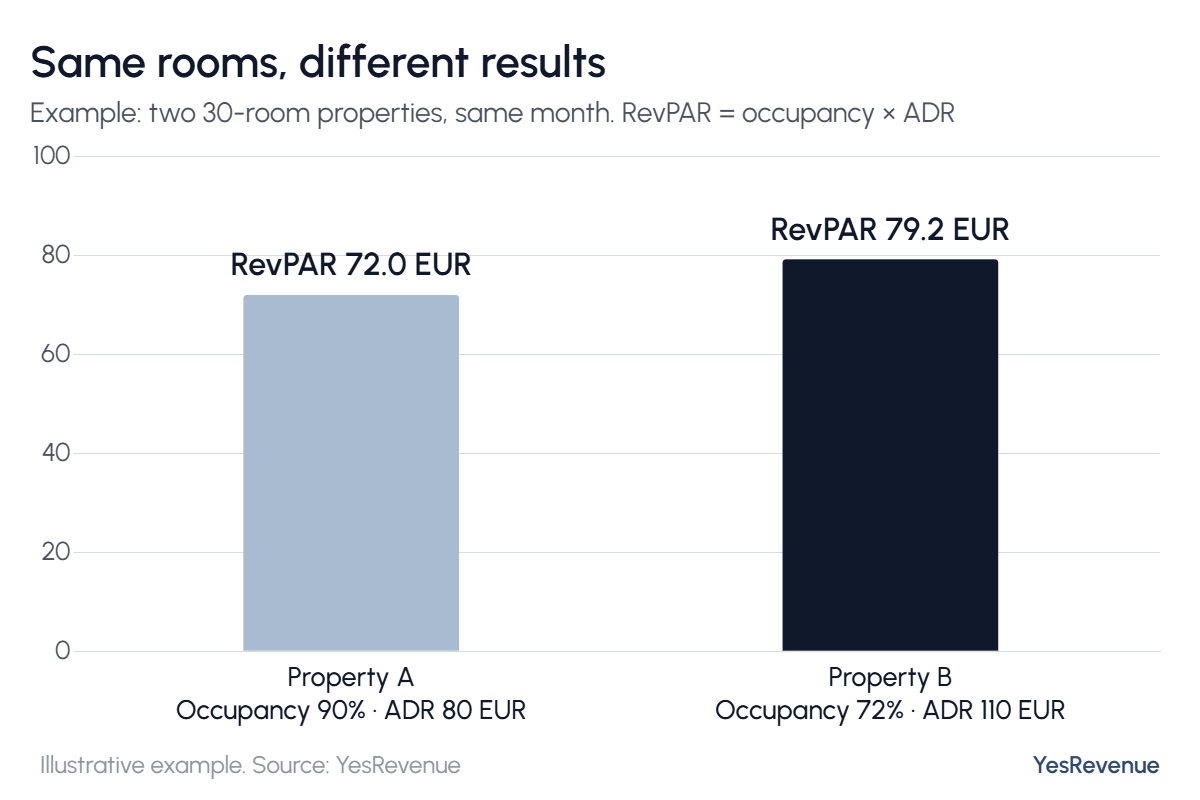
Property A looks busier. Property B makes more money from the same 30 rooms, and it has fewer guests to check in, clean up after and look after. Over a 30-day month that gap is worth about 6.5k EUR in room revenue.
But Do Not Chase RevPAR Blindly
RevPAR is not profit. Every occupied room costs money: cleaning, laundry, amenities, energy, staff time, and commission if the booking came through an OTA. Two properties with the same RevPAR can end the year with very different bottom lines. That is why we also look at revenue net of commission (more in Net Revenue vs Gross Revenue).
There is one more trap: high occupancy is not automatically good news. If you are full every weekend months in advance, you are probably too cheap on those dates. Once a property is full, the only lever left is rate.
How to Use the Three Numbers
- Look at them per day and per day of the week, not only per month
- Compare like with like: the same days last year, or your position on the books at the same point last year
- Watch RevPAR first, then ask whether occupancy or ADR drove the change
- Set a monthly target for all three and check it every week
Want more occupancy without giving away rate? See How to Increase Hotel Occupancy Without Cutting Your Prices.
Get these three right and every other conversation about pricing gets easier. Setting the targets and steering every date towards them is the core of our Revenue & Pricing Management. If you would like us to look at your numbers, book a free Performance Assessment Call.